
[QUICK POST] Check if Citrix Workspace Environment Management (WEM) is LAS activated
Update 21.01.2026 02:55 pm UTC
Citrix has since updated the referenced article and added instructions for WEM as well.
According to Citrix, you can verify LAS activation by checking the “Citrix WEM Infrastructure Service Debug.log” file for the following entry:
|
1 |
Finish to check activation from Citrix Licensing Service (Web), license valid: True |
That said… you still need to enable debug mode for the log file to be generated in the first place, so the plot remains largely unchanged
——————
Hey CVAD folks,
as you’ve probably already noticed (or been gently encouraged), Citrix is sunsetting file-based licensing, and customers are now expected to embrace the License Activation Service (LAS).
Citrix has published a solid article (CTX695846) explaining how to verify whether your products are properly LAS-activated. However, at the time of writing (21.01.2026), WEM is still the odd one out and doesn’t appear on that list.
Why is that?
Well… because checking whether WEM is LAS-activated is a bit of a treasure hunt.
The relevant information lives in the event log and only shows up once debug mode is enabled. Naturally.
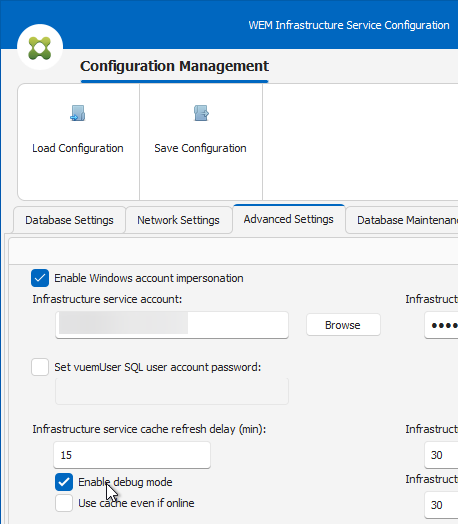
To make life a little easier, AI and I put together a small PowerShell script. It first checks whether debug mode for the WEM Infrastructure Service is enabled and, if so, scans the “WEM Infrastructure Service” eventlog for the relevant LAS licensing messages.
You can find the most recent version of the script on GitHub, and as always: feel free to use it, tweak it, improve it, or bend it to your will 🙂
CVAD/Check-WEMLASActivation.ps1 at main · MarkusZehnle/CVAD
|
1 2 3 4 5 6 7 8 9 10 11 12 13 14 15 16 17 18 19 20 21 22 23 24 25 26 27 28 29 30 31 32 33 34 35 36 37 38 39 40 41 42 43 44 45 46 47 48 49 50 51 52 53 54 55 56 57 58 59 60 61 62 63 64 65 66 67 68 69 70 71 72 73 74 75 76 77 78 79 80 81 82 83 84 85 86 87 |
<# .SYNOPSIS Checks Citrix WEM Infrastructure Service licensing events, but only if Debug Mode is enabled. .DESCRIPTION This script verifies whether Debug Mode for the Citrix WEM Infrastructure Broker Service is enabled by reading the registry value (REG_DWORD): HKLM\SYSTEM\CurrentControlSet\Control\Norskale\Infrastructure Services\BrokerServiceDebugMode Debug logging is required for detailed licensing-related WEM events. Enabling Debug Mode will restart the Citrix WEM Infrastructure Service and produces verbose (chatty) logging. If Debug Mode is enabled, the script queries the "WEM Infrastructure Service" event log and returns the 5 most recent licensing-related entries matching a defined message pattern. If Debug Mode is not enabled, the script exits with a warning and provides instructions on how to enable Debug Mode. Possible event log messages you could check for include: (1) "LICENSING: LS returned LAS Activation for WEM with expiration m/dd/yyyy" (2) "LICENSING: LS indicates WEM is LAS Activated. Activation expires on m/dd/yyyy" (3) "Finish to check activation from Citrix Licensing Service(Web), license valid: True" (4) "LICENSING: LS returned activation list with x entries" (x = number) Not specific to LAS but licensing in general: "License server connection successful [hostname.domain.tld:27000]" .VERSION 1.0 / 2026.01.21 / MZe - Initial creation .EXAMPLE PS C:\> .\Check-WEMLASActivation.ps1 Checks whether WEM Debug Mode is enabled and, if so, outputs the five most recent LAS licensing-related event log entries. #> # Message pattern to check $messageToCheckFor = 'LICENSING: LS indicates WEM is LAS Activated.*' # Registry path for WEM Debug Mode $RegPath = 'HKLM:\SYSTEM\CurrentControlSet\Control\Norskale\Infrastructure Services' $RegValue = 'BrokerServiceDebugMode' # How many entries you wanna see? $numberOfEntriesToReturn = 5 # Check Debug Mode try { $DebugMode = Get-ItemPropertyValue -Path $RegPath -Name $RegValue -ErrorAction Stop } catch { Write-Warning "Unable to determine WEM Infrastructure Service Debug Mode (registry value not found)." return } if ($DebugMode -ne 1) { Write-Warning @" WEM Infrastructure Service Debug Mode is NOT enabled. To enable debug mode: 1. Start 'WEM Infrastructure Service Configuration' 2. Go to the 'Advanced Settings' tab 3. Check 'Enable debug mode' 4. Click 'Save Configuration' Attention: Citrix WEM Infrastructure Service restarts and debug mode is chatty! ;) "@ return } Write-Host "WEM Infrastructure Service Debug Mode is ENABLED. Checking event log entries..." -ForegroundColor Green # Query eventlog and return only the $numberOfEntriesToReturn most recent entries $events = Get-WinEvent -FilterHashtable @{ LogName = 'WEM Infrastructure Service' } | Where-Object { $_.Message -like $messageToCheckFor } | Sort-Object TimeCreated -Descending | Select-Object -First $numberOfEntriesToReturn TimeCreated, Id, LevelDisplayName, Message $events |